A client asks for one more page.
Then a different version.
Then another revision that was never part of the original agreement.
None of the requests feels large enough to create a problem on its own. The problem appears later, when the project has changed but the budget, deadline and original scope have not.
That is where scope creep becomes expensive.
The solution is not to reject every change. Good projects change. The important part is making each change visible before the extra work begins.
The real problem is not the request
A new client request is not automatically scope creep.
It might be:
- part of the original agreement;
- a normal revision;
- a correction;
- genuinely new work;
- or a trade-off where something new replaces something already planned.
The problem starts when nobody makes that distinction.
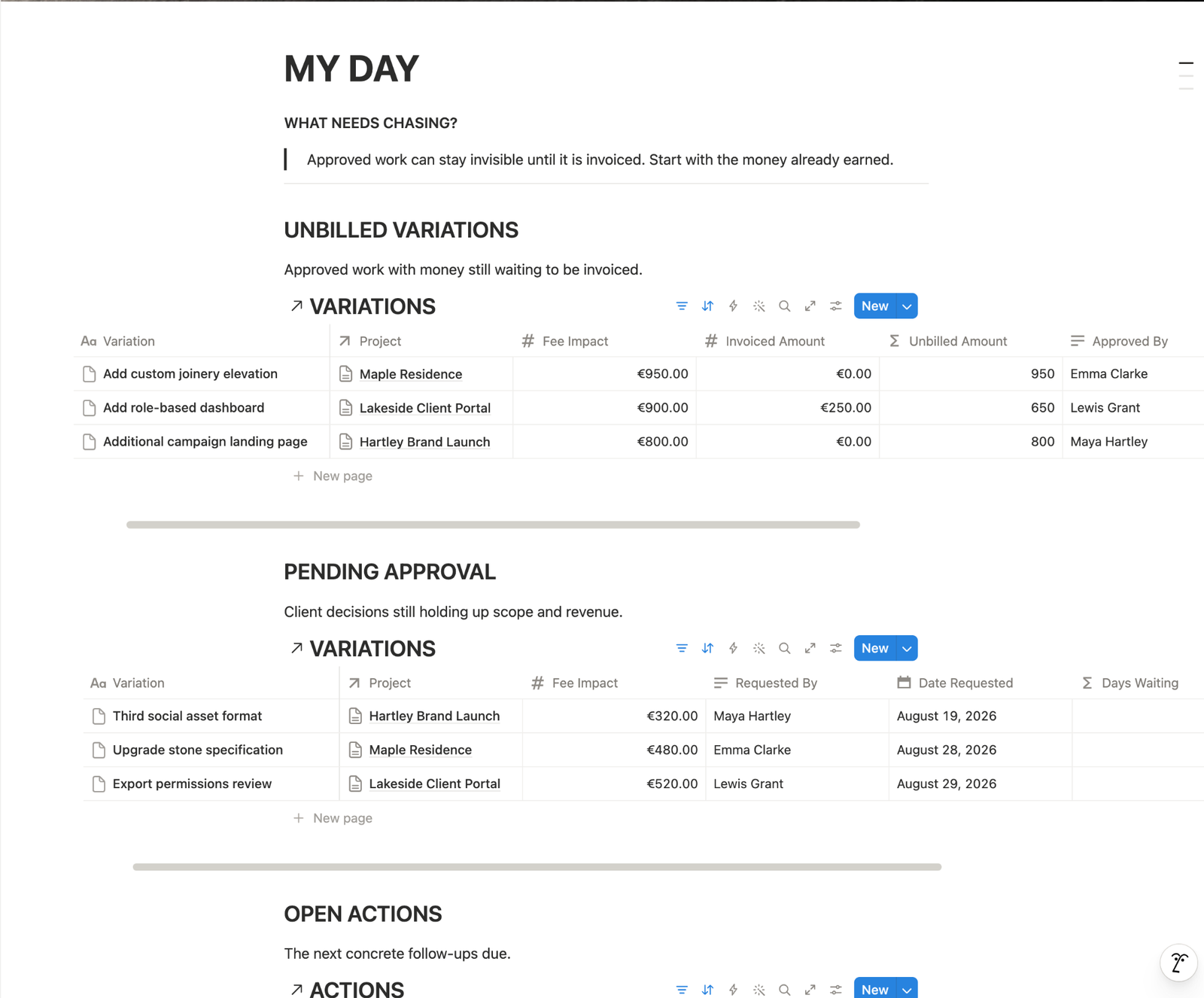
A request arrives in an email, Slack message or call. Someone says yes. Work begins. Two weeks later it is difficult to remember what was originally included, why the change happened or whether anyone agreed to the additional cost.
Instead of treating every request as another task, treat it first as a decision.
A simple five-step scope change workflow
Every meaningful client change should move through five stages:
Request → Assess → Decide → Document → Act
The workflow is intentionally simple. Its purpose is not to add administration. Its purpose is to stop work from beginning while the important questions are still unanswered.
1. Request — record what the client actually asked for
Capture the request before translating it into a task.
Record:
- what the client wants;
- when they requested it;
- who requested it;
- which project or deliverable it affects.
Avoid vague records such as “homepage changes” or “extra work”.
A useful request is specific enough that someone reading it later can understand what changed without reopening an old email thread.
2. Assess — compare it with the agreed scope
Now ask the most important question:
Was this work already included?
If it was included, manage it normally.
If it was not, assess its impact before accepting it.
That normally means looking at:
- additional work required;
- estimated hours;
- additional fee;
- effect on the delivery date;
- dependencies or work that must move.
This separates the emotional question — “Can you do this for me?” — from the operational question — “What changes if we do it?”
You can often say yes to the first while still needing an answer to the second.
3. Decide — make the consequence explicit
Once the impact is known, the change needs a decision.
Typical outcomes are simple:
- Included — The request already belongs inside the agreed work.
- Approved change — The client accepts the additional scope and its consequences.
- Declined — The original project continues unchanged.
- Pending — No additional work begins until the decision is clear.
The status matters because a request is not the same thing as an approval.
Neither is a conversation about a request.
4. Document — preserve the decision
A useful change record should allow you to answer later:
- What changed?
- Who requested it?
- What was the impact?
- Who approved it?
- When was it approved?
For paid changes, it should also preserve the relationship between the approved change and its financial status.
That does not require complicated project-management software.
A structured database, spreadsheet or internal system can work perfectly well if it gives every change one clear record and one source of truth.
What matters is that approval stops living only in somebody’s memory or inbox.
5. Act — turn approved changes into work
Only now should the approved change become execution.
Create the required actions, adjust the schedule and update the relevant commercial information.
This order matters.
When teams create the task first and investigate scope later, extra work can already be underway before anyone notices that it was never approved.
The change record should therefore sit before execution, not after it.
Revision or new scope?
This is one of the most useful distinctions to establish with clients.
A revision normally improves the deliverable you already agreed to create.
New scope expands or materially changes that deliverable.
Changing a headline in an agreed landing page may be a revision.
Adding another landing page probably is not.
Adjusting the spacing on an agreed design may be a revision.
Introducing an entirely new design direction after approval may not be.
There will always be grey areas. The goal is not to create perfect legal definitions for every possibility.
The goal is to make ambiguous work visible early enough to discuss it.
What to say when a client asks for something extra
Scope control does not need to sound defensive.
A simple response can be enough:
“Happy to look at that. Let me check it against the current scope and confirm any impact on cost or timing before we add it to the project.”
You have not said no.
You also have not accidentally said yes to undefined work.
You have created a decision point.
Keep the system smaller than the problem
A scope-control process can become so complicated that nobody uses it.
Avoid that.
You do not need a second CRM, a huge project-management system or twenty statuses.
For many service businesses, three connected things are enough:
- Projects — what was agreed.
- Changes — what moved outside or altered that agreement.
- Actions — what must happen after a decision.
The cockpit should stay simple even when the work behind it is complicated.
The rule worth keeping
When a client changes the project, do not immediately ask:
“How do we do this?”
Ask first:
“What does this change?”
Then assess it, get the decision, record it and only then turn it into work.
That small sequence protects the budget, the timeline and the client relationship without turning every change into a confrontation.