A client says, “Looks good.”
Two weeks later, they ask for another change and nobody is quite sure whether the previous version was actually approved.
The problem is not that the team failed to communicate. The problem is that a conversation was allowed to stand in for a decision record.
Useful client approval should make five things clear: what was approved, which version or scope it covered, who approved it, when they decided and what happens next.
Feedback is not approval
Comments such as “looking good”, “almost there” or “fine with me” can be useful feedback without being a final decision.
Approval needs a defined object and a defined outcome.
If a client is reviewing a design, proposal, deliverable or scope change, the record should identify exactly what the decision applies to. Otherwise a later discussion can reopen work that everyone thought was closed.
What a useful approval record contains
You do not need a complicated approval portal. You need enough information to reconstruct the decision without relying on memory.
- Decision — approved, declined, changes requested or pending.
- Item — the deliverable, version, milestone or scope change being reviewed.
- Approver — the person who made the decision.
- Date — when the decision was made.
- Evidence — where the approval came from when that matters.
- Next action — what the decision now allows or requires.
For a commercial scope change, also record the agreed cost and timeline impact when relevant.
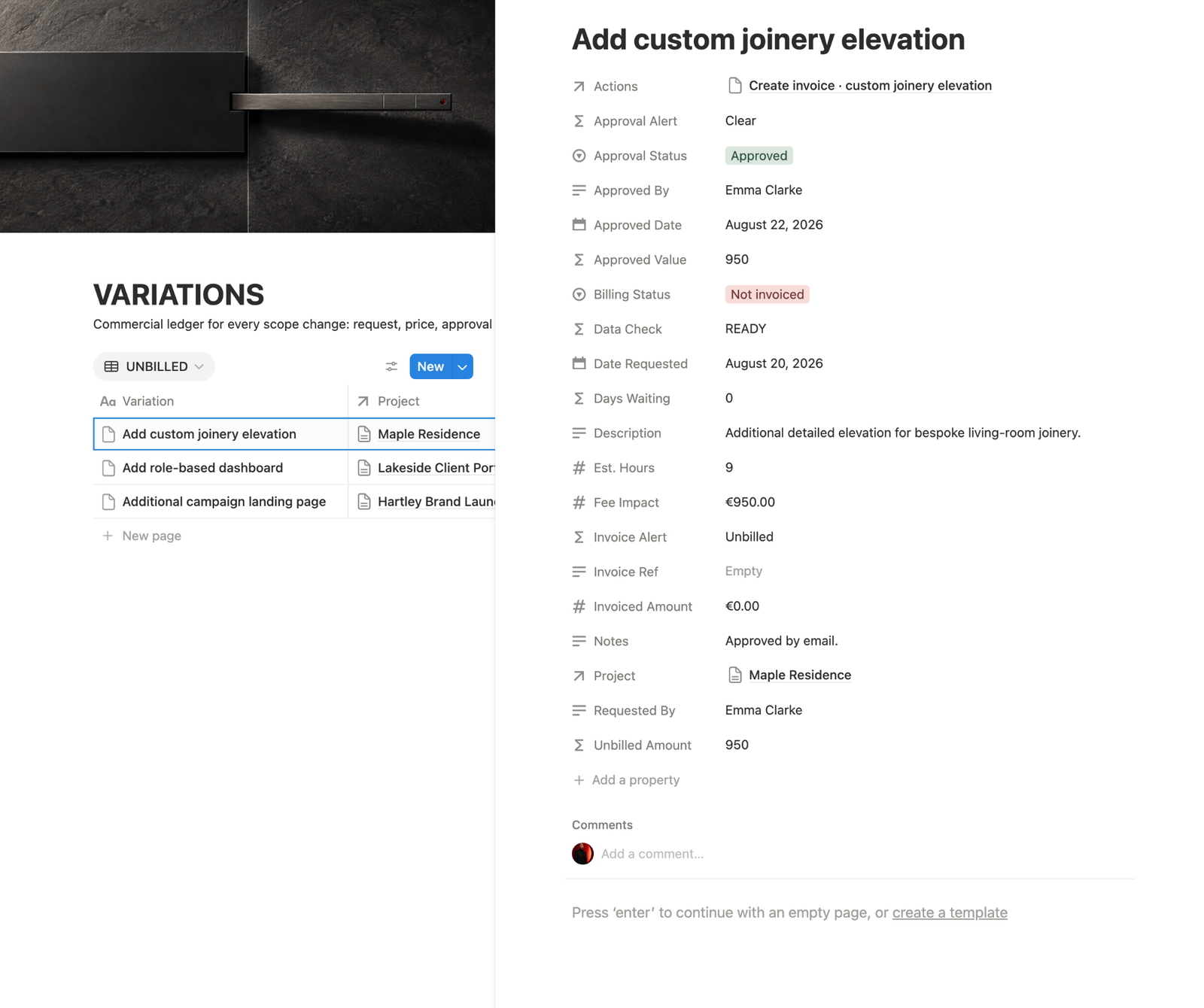
When one request creates a scope change, an approval and a delivery decision, keep those records connected. See the worked example for connecting client approvals, scope changes and decisions.
Tie approval to the thing that was reviewed
“Homepage approved” is better than “approved”, but it may still be too vague if several versions exist.
A stronger record might identify the homepage design, its version or date and the decision that closes that review stage.
The same principle applies to scope changes. Approval should point to the request and its impact, not merely to a message saying yes.
Separate approval from changes requested
One of the most confusing responses is some version of “approved, but change this”.
Do not force that into a clean Approved status if more work is still required.
Use statuses that describe what the team can actually do next:
- Approved — this review stage is closed and the work can move forward.
- Changes requested — revisions are required before approval.
- Pending — a decision has not been made.
- Declined — the proposed item or change will not proceed.
If the requested changes alter the agreed work, run a scope check before treating them as another revision.
Know who can approve
Projects become fragile when several stakeholders can comment but nobody knows who has authority to close the decision.
Feedback can come from many people. Final approval should have a clear owner.
That does not require bureaucracy. It simply prevents the team from acting on one stakeholder’s preference while another stakeholder still believes the decision is open.
Preserve evidence without turning the project into an archive
The goal is not to save every message forever.
Keep the evidence that explains the decision: an approval email, a client portal response, a signed change request or another written confirmation that identifies what was decided.
Then connect that evidence to the approval record rather than leaving the project dependent on searching an inbox months later.
Six replies: what can you safely record?
These fictional examples show how to organise project decisions. Read each reply alongside its original review request: context can make a short answer clear, while a longer answer may still leave conditions unresolved.
| Reply | Reviewed item | Record outcome | Next action |
|---|---|---|---|
| “Looks good” | Homepage v3 | Pending clarification | Ask whether review is closed |
| “Approve homepage v3 for build” | Homepage v3 | Approved | Record approver/date; begin build |
| “Approved, change the pricing” | Pricing page v2 | Changes requested | Clarify exact edits and next review |
| “Yes to the extra page at the quoted fee” | Change CR-04 revision 2 | Confirm full conditions | Confirm quoted schedule too |
| “No, keep the original layout” | Layout alternative B | Declined | Keep baseline; archive decision |
| “Marketing likes it” | Campaign artwork v4 | Authority unconfirmed | Ask designated approver |
Item: Homepage v3
Decision: approved for build
Approver: Alex, designated client approver
Date: 12 October 2026
Evidence: linked confirmation email
Next action: create build tasks.
This approval closes the homepage review only. It does not approve other pages, unresolved change requests or later versions.
Check the record: opening its evidence should identify the same version and outcome. If the source says “v2” while the record says “v3”, clarify the mismatch before proceeding. Preserve the reviewed file or stable version link alongside the reply.
For conditional feedback, use the feedback log. Check revision versus new scope before adding requested edits to delivery.
A simple approval workflow
A lightweight process can be:
Review → Clarify → Decide → Record → Act
1. Review
Send or present the exact item that needs a decision.
2. Clarify
Resolve ambiguous feedback and separate normal revisions from requests that change scope.
3. Decide
Get an explicit outcome from the person responsible for approval.
4. Record
Capture the item, decision, approver, date and relevant evidence in one place.
5. Act
Move to the next stage only when the recorded decision allows it.
What to ask when the approval is vague
You do not need legalistic language. You need a clear decision.
Just to close this stage clearly: can you confirm that this version is approved and we can move forward with it?
If changes are still required, ask the client to identify them before recording the item as approved.
Frequently asked questions
Is “looks good” always too vague to count as approval?
It depends on the review request and surrounding context. If the exact version, decision and next stage are unclear, ask for confirmation instead of guessing.
What if the client approves but asks for changes?
Record the remaining conditions or Changes requested. Confirm whether another review is required and what, if anything, can proceed before those changes are complete.
What should I do after approval in a call?
Send a concise written recap identifying the item, version, decision and next action. Ask the designated approver to confirm it and link their reply to the record.
Does approving one version approve future changes too?
Treat the decision as applying to the identified version and scope. Record later revisions or additions separately and obtain the relevant decision before proceeding.
Still awaiting a decision? Use the waiting-on-client workflow to record the owner, next checkpoint and schedule impact.
The rule worth keeping
Do not make future-you reconstruct an important client decision from memory.
Record what was decided, what the decision applied to, who made it and when.
Approval should close uncertainty, not create another version of it.
If the approval belongs to a scope change, connect it back to the change request workflow. If the decision matters beyond a single change, preserve it in a client decision log so the reasoning does not disappear with the message thread.